Starlink, the satellite internet division of SpaceX, announced on June 25, 2026 that it is offering free service to those affected by the devastating earthquakes in Venezuela. The measure applies to new and existing customers and will be in effect until July 25, 2026, according to @Starlink en X and the support page linked.
Connectivity in disaster zones
Starlink indicated that it is working to deploy terminals quickly and restore connectivity in the hardest hit areas. After the seismic double of June 24, Venezuela suffered telecommunications outages; SpaceX's LEO network can operate without relying on damaged fiber or towers.
Video: this is the Starlink team
Video: Starlink kit in operation
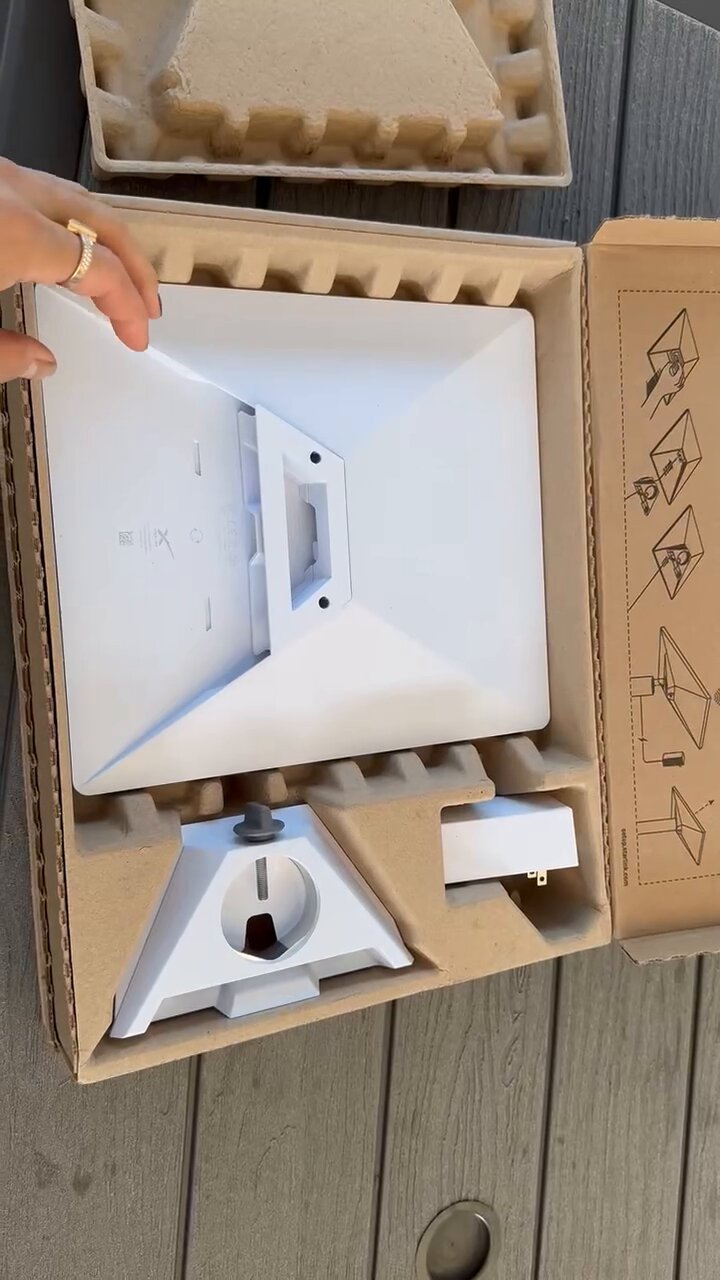
Clip shared in response to Starlink's announcement about Venezuela: shows the antenna, router and kit assembly. Source: @YongseokChoi9 on X
What is included in the kit and how to install it
Starlink's standard residential kit—the one they typically deploy in emergencies—includes:
- Antenna (dish): motorized rectangular panel that automatically points to satellites.
- Wi-Fi Router: distributes the signal within the home or building.
- Cables and source: power and connection between antenna and router.
- Support: base for floor, ceiling or pole (depending on the kit).
The installation is self-installation: Starlink recommends placing the antenna in a place with a clear view of the sky (roof, balcony or garden). After connecting the cable and turning on the device, the Starlink app guides the orientation and verifies the signal quality. It does not require a specialized technician in most cases; The process is usually completed in 15–30 minutes.
In disaster zones, humanitarian organizations and emergency teams use the same scheme: mount the antenna as high as possible, away from trees or collapsed buildings that block the line of sight, and connect several devices to the router to coordinate rescues and communications.
Models available in the US
In the United States, Starlink mainly markets these devices (June 2026):
- Starlink Standard (Gen 4): rectangular antenna for a fixed home or business. It is the one that appears in most residential and emergency deployments.
- Starlink Mini: compact and portable kit, designed for travel and mobile use (Roam plans).
- Starlink Business / High Performance: higher capacity antennas for companies, tall buildings or areas with heavy snow (less common in domestic use).
Where to buy and reference prices
Official website: the starting point is starlink.com/us. There you enter the address, check coverage and choose a plan. From mid-2026, many markets — including the US — show residential kit as $10/month rental instead of direct purchase on the web, according to reports from Ars Technica and PCMag.
Physical and online stores: The Standard kit is sold in retailers such as Best Buy, Walmart and Amazon. Buying it there allows you to activate a residential plan on starlink.com and avoid the monthly rental of the equipment. In-store prices vary with promotions (historically between ~$199 and ~$349 for the Standard kit).
Monthly residential plans (reference US, June 2026):
- Residential 100 Mbps: ~$55/month (+ $10/month kit rental if applicable).
- Residential 200 Mbps: ~$85/month (+ kit rental).
- Residential Max: ~$130/month, up to ~400 Mbps (+ kit rental).
- Starlink Mini (Roam): hardware from ~$199 + Roam plans from ~$55/month (100 GB) or ~$80/month (300 GB).
Prices may change depending on availability and promotions. MARGENEZ recommends confirming current rates at starlink.com before purchasing.
What does the free service in Venezuela imply?
- Existing customers in affected areas: billing suspended until July 25, 2026.
- New subscribers in impacted areas: activation at no cost during the same period.
- Hardware deployment: priority in locations without an operational fixed or mobile network.
The 7.5 magnitude earthquake left hundreds dead, thousands injured and severe damage in La Guaira, Maiquetía and Caracas. Restoring the internet accelerates rescues, locating missing persons and channeling humanitarian aid.
In summary
What does Starlink offer? Free satellite Internet until July 25 in Venezuela for those affected by the earthquakes. What is the equipment like? Rectangular antenna + router; App-guided installation with a view of the sky. Where to buy in the US? Official website, Best Buy, Walmart and Amazon. How much does it cost? Plans from ~$55/month; rented kit ~$10/month or in-store purchase (~$199–$349). More context? Special coverage of the earthquake.
Most read
What readers are engaging with right now.
- Culture
Goose, the gay app that competes with Grindr, reaches the top 4 of Lifestyle in the App Store

- World
Cubans protest in Miami against Airlines Connections for alleged scam: they demand up to $20,000 in packages to Punta Cana

- World
Trump declares the ceasefire with Iran over, orders new attacks in Hormuz and demands cutting trade with Spain in NATO

- Culture
Harry Potter on HBO: complete guide to the series (not yet released and already renewed for T2), dates, cast and controversies

- Culture
DUK App: Aly Sánchez launches her habits app "one day at a time" with a 63-day program

- Culture
I'm Edgy and Edgy Labs: From Nebraska's Walmart to a beef tallow cream brand that sells across the US.

- Culture
The Evening of the Year VI: all the winners, fights and performances of the Ibai night in Seville

- World
The FBI is investigating the AFA for alleged fraud and money laundering: about $300 million in sponsorships and operations in the US.

- World
El Cangrejo: profile of Raúl Guillermo Rodríguez Castro, Raúl Castro's grandson between GAESA, leaked luxuries and the first interview of 2026
