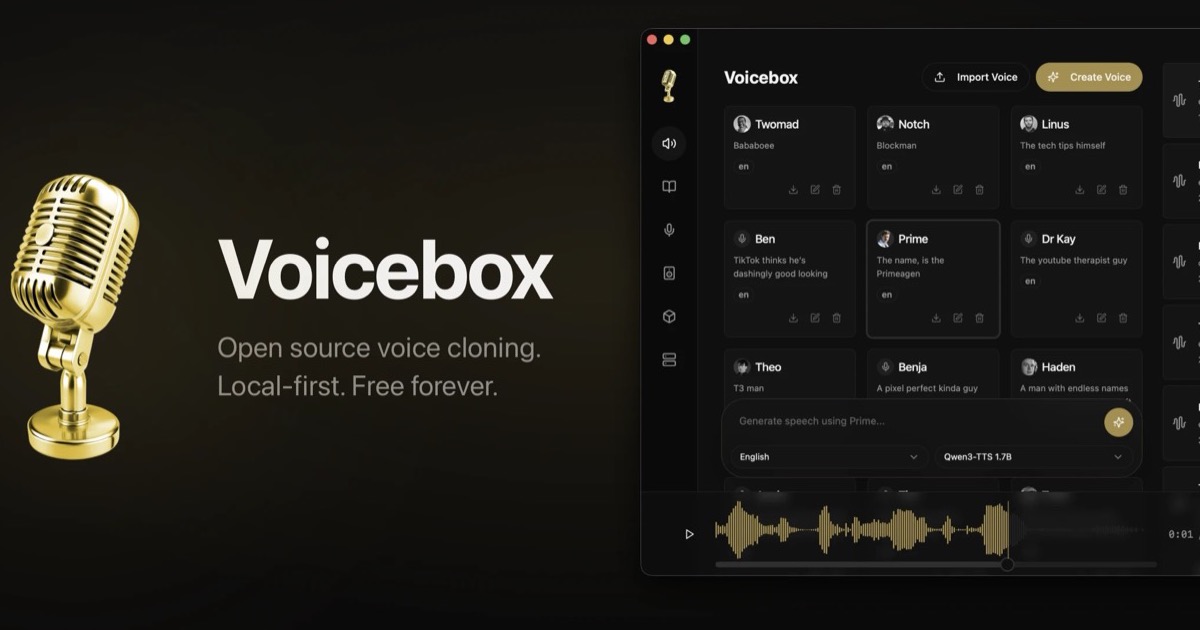
If you are looking to clone a voice, generate narration or dictate text without paying a subscription or uploading audio to third-party servers, Voicebox is one of the projects that has gained the most traction in 2026. Created by Jamie Pine and published under MIT license in GitHub, sold as a free local alternative to ElevenLabs and WisprFlow: cloning, seven TTS engines, dictation with Whisper, multitrack editor, audio effects and a REST API — all running on your Mac, PC or Linux with GPU (Metal, CUDA, ROCm, DirectML) or CPU.
What Voicebox does in practice
The site's promise is threefold: Clone (clone voices), Capture (dictate and transcribe) and Create (generate speech and multi-character stories). Unlike a simple web cloner, Voicebox is a full desktop app with generation history, reusable voice profiles, and an embedded HTTP server at 127.0.0.1:17493 for integrations.
- Almost instant cloning: drag a WAV/MP3/FLAC, record up to 30 seconds with the microphone or capture system audio (YouTube, podcast, any app).
- Stories Editor: timeline to mix several voices in the same script — useful for podcasts, amateur dubbing or game prototypes.
- Effects pipeline: pitch, reverb, delay, compression; Saveable presets per voice profile.
- Long generation: up to 50,000 characters per request, split into phrases and joined with crossfade.
- Personalities: free text that defines character; Rewrite modes (same content, different delivery) and Compose (in-character improvisation).
Video: installation and cloning tutorial (Kevin Stratvert)
Recommended walkthrough on the Voicebox website to install the app and clone a voice on a PC. Source: Kevin Stratvert — YouTube · listed in voicebox.sh
Seven TTS engines under one roof
Since version 0.2.0, Voicebox stopped depending on a single model and became a multi-engine platform. You can choose engine by generation according to quality, language or hardware:
- Qwen3-TTS (Alibaba, 0.6B/1.7B): Multilingual cloning with natural language delivery instructions (“slow and warm talk”).
- Chatterbox (Resemble AI): 23 languages, zero-shot cloning and emotion control.
- Chatterbox Turbo (350M): fast; supports
[laugh],[sigh],[gasp]tags. - LuxTTS (ZipVoice): CPU oriented, 48 kHz, >150× realtime on CPU depending on the project.
- Qwen CustomVoice: nine preset speakers with control by instructions.
- TADA (Hume AI): intended for long forms (700+ coherent s).
- Kokoro (Apache 2.0, 82M): minimum VRAM, real time on CPU, preset voices.
For transcription and dictation use Whisper (various sizes + Turbo) in 99 languages. An optional local LLM Qwen3 cleans up dictation fillers (“um”, autocorrections) without rewriting the meaning — comparable to WisprFlow, but offline.
Global dictation: speak and paste in any app
Hold ⌘⌥ on macOS or Ctrl+Alt on Windows, speak and release: the text falls into the active field or clipboard. Voicebox displays a floating pill while recording and transcribing. It is the flow that competes directly with dictation in the cloud, with the advantage that the audio and the model can remain on disk.
MCP: Cursor and Claude Code with voice
One of the most interesting angles for developers is the included MCP server. Just add to the agent config:
{
"mcpServers": {
"voicebox": {
"url": "http://127.0.0.1:17493/mcp"
}
}
}
From there any compatible client (Claude Code, Cursor, Cline...) can invoke voicebox.speak with a cloned voice profile. You can assign different voices per agent — Morgan for Claude, another for Cursor — and see on screen when the agent is speaking. There is also POST /speak for scripts, Stream Deck or games.
Local API without API keys
Each downloaded engine exposes REST endpoints on localhost. Official example from the site to generate a line:
curl -X POST http://127.0.0.1:17493/generate \
-H "Content-Type: application/json" \
-d '{
"text": "Welcome to the game, player one.",
"profile_id": "b3f1c2d4-5e6f-4a7b-8c9d-0e1f2a3b4c5d",
"engine": "qwen_custom_voice",
"instruct": "warm, slow, cinematic"
}' \
--output line.wav
No character fees, no third-party rate limits and offline operation once the models are downloaded. The OpenAPI documentation lives in /docs when the app is running.
Hardware: local, remote or Docker
Voicebox detects NVIDIA (CUDA), AMD (ROCm), Intel Arc, Apple Silicon (Metal) and DirectML GPUs on Windows. It also allows you to point the inference to another machine on the network — useful if your laptop is weak but you have an RTX PC at home. There is a Docker image for headless deployment without a graphical interface.
Is it really free?
Yes for the core. The pricing page clarifies that cloning, dictation, all engines, MCPs and personalities run locally without a mandatory account. Optional paid plans add cloud backup and sync; The project promises to remain "free and open source forever." There is also a $VOICEBOX token on Solana for anyone who wants to support the author — it does not unlock features.
Limitations and ethical considerations
Cloning real voices—celebrities, colleagues, clients—poses risks of impersonation and image rights. Voicebox includes preset voices with recognizable names (Jarvis, Morgan Freeman, Barack Obama...) clearly oriented towards entertainment and parody; In commercial production it is advisable to use samples with consent or your own voices. Quality depends on the hardware: a Mac with Apple Silicon or a dedicated GPU makes a difference compared to a CPU alone. And the repository accumulates hundreds of open issues: it is young software, although with a very active community.
In summary
Voicebox condenses into a single app what previously required ElevenLabs + WisprFlow + loose plugins: cloning, TTS multimotor, Whisper dictation, effects, multitrack editor, API and MCP for agents. If your priority is privacy, zero recurring cost and control of the voice AI stack, it deserves to be on the list of tools to try in 2026 — starting with the official download or the source code.
Most read
What readers are engaging with right now.
- Culture
Goose, the gay app that competes with Grindr, reaches the top 4 of Lifestyle in the App Store

- World
Cubans protest in Miami against Airlines Connections for alleged scam: they demand up to $20,000 in packages to Punta Cana

- World
Trump declares the ceasefire with Iran over, orders new attacks in Hormuz and demands cutting trade with Spain in NATO

- Culture
Harry Potter on HBO: complete guide to the series (not yet released and already renewed for T2), dates, cast and controversies

- Culture
DUK App: Aly Sánchez launches her habits app "one day at a time" with a 63-day program

- Culture
I'm Edgy and Edgy Labs: From Nebraska's Walmart to a beef tallow cream brand that sells across the US.

- Culture
The Evening of the Year VI: all the winners, fights and performances of the Ibai night in Seville

- World
The FBI is investigating the AFA for alleged fraud and money laundering: about $300 million in sponsorships and operations in the US.

- World
El Cangrejo: profile of Raúl Guillermo Rodríguez Castro, Raúl Castro's grandson between GAESA, leaked luxuries and the first interview of 2026
