Google has taken an important step for creators, brands and media that publish outside their own domain: Search Console is no longer limited to websites. With the new platform properties, you can connect Instagram, TikTok, YouTube and X and see how that content appears in Google Search and Discover. In parallel, Google Analytics continues to be the tool to measure what users do once they arrive at your website or application. In this guide we review both platforms and how to use them together in 2026.
1. What is Google Search Console
Google Search Console is Google's free console for site owners and, from 2026, also for social media and video creators. Its main function is to show how Google sees your content in search: which pages or posts are indexed, which queries generate impressions, how many clicks you receive and if there are technical errors that prevent you from appearing in results.
Traditionally you verified a domain or URL prefix. Classic reporting—performance, index coverage, page experience, structured data—remains the core of any website. The big news in 2026 is that this same performance logic in Google reaches profiles that only exist on third-party platforms.
2. What's new: platform properties
On July 7, 2026, Google announced on its Search Central blog platform properties: a new property type in Search Console for monitor how content from Instagram, TikTok, X and YouTube is discovered in Google Search and Discover.
The feature rolled out gradually throughout July, and based on the global availability announcement at the end of the month, it is now open to all Search Console users, whether or not they have a verified website in the same account.
Supported platforms
- Instagram — posts and stories when they appear in Google results.
- TikTok — videos that Google shows in search or Discover.
- X — posts and profile content with visibility on Google.
- YouTube — videos and channel when users find them via search (does not replace YouTube Studio for in-platform metrics).
Each account or channel is a independent property. If you manage three Instagram profiles and one YouTube channel, you must add four separate properties.
Reports available
Google replicates the same approach as on websites for these properties:
- Performance — clicks, impressions, average CTR, average position; filters by query and by specific publication; data export.
- Insights — overview of trends, top-performing content, and ways to discover things on Google.
- Achievements — milestones such as reaching a threshold of clicks from Search in the last 28 days.
The default period is 28 days. Discover and Google News reports only appear if your content receives traffic from those surfaces.
3. How to connect your accounts
The process is similar to verifying a site, but instead of a domain you authorize the account on the platform using OAuth. According to the official documentation in Spanish:
- Enter Search Console.
- Open the property selector in the sidebar and tap Add Property (or use the welcome screen if this is your first time).
- In the list of platforms, click Add next to Instagram, TikTok, X, or YouTube.
- Follow the on-screen steps to authorize the connection with the correct account.
- After verification, press Go to property. It may take a few days for the data to start displaying.
Google periodically checks the connection for security. If the external session expires, access to the property is paused until you check in again; You do not lose the accumulated history.
4. What data you get (and what you don't)
It is essential to understand reach: Search Console measures visibility on Google, not performance within Instagram, TikTok, X or YouTube.
- Does measure impressions and clicks when your content appears in search results, Discover or (if applicable) Google News.
- It does not measure likes, followers, organic reach in the feed, playback time in the app or analytics from the study of each network.
- Instagram Stories — if displayed on Google, they count as an impression; a click on the result counts as a click.
- Videos on Google — the impression is recorded when displayed in results or Discover; The click is counted even if the video is opened in Google Viewer.
For creators without their own website, this closes a historical gap: you can finally know which search terms bring traffic to your Google profile. For brands with websites and networks, it allows you to compare which social pieces generate discovery in search engines versus those that only live in the native feed.
5. Google Analytics: what it is and what's new in 2026
Google Analytics (today GA4) answers another question: what do users do on your digital property—page views, events, conversions, funnels, retention—once they arrive at your site or app. It does not replace Search Console; complements it.
Video: first steps with Google Analytics 4
Krista Seiden from the Google Analytics team explains the structure of a GA4 property and the setup wizard. Source: Google Analytics (official YouTube)
Access and structure
At analytics.google.com you log in with your Google account. The hierarchy is: account → property → data flow (web, iOS or Android). To start from scratch, the official guide recommends creating a GA4 property, setting up a web data flow, and installing the gtag.js tag or Google Tag Manager. You can follow the tutorial in the GA4 configuration help.
Relevant developments in 2026
-
AI Assistants Channel (May 13, 2026) — GA4 automatically classifies traffic from recognized AI assistants (ChatGPT, Gemini, Claude and others as listed by Google) into a dedicated channel from the default channel group, with media
ai-assistantand campaign(ai-assistant). Detail in the official Analytics news. - Explicit exclusion — traffic from Google's AI Overviews and AI Mode does not enter that channel; It is still counted as organic search, as defined by the default channel group.
- Conversion attribution — you can set up different attribution models and windows for each key event, useful when comparing paid, organic, and AI referral campaigns.
- Generated Reports and Insights — the GA4 home page summarizes anomalies and trends without you having to assemble each report by hand.
If you want to capture attendees that Google doesn't yet recognize natively (Perplexity, Copilot, or others), the documentation suggests creating a custom channel group with regular expressions and placing it above “Referral” so that it doesn't get mixed up with generic referrals.
6. Search Console vs Analytics: when to use each one
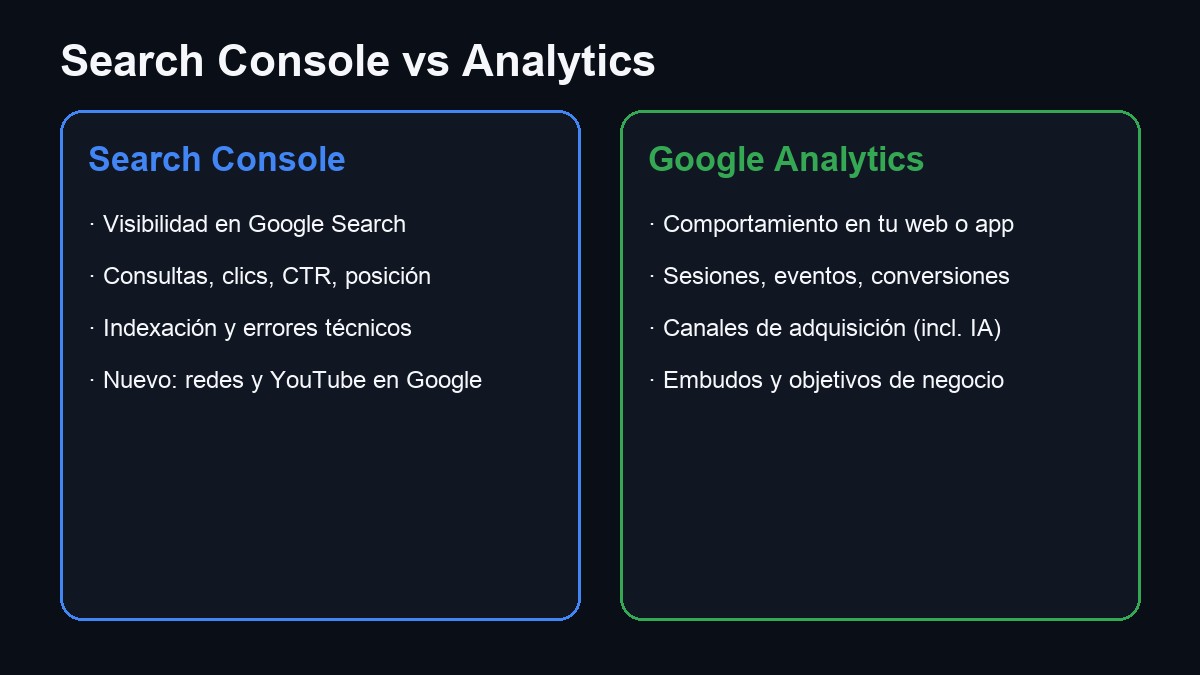
Quick comparison
| Tool | Question that answers | Web required | Networks (July 2026) |
|---|---|---|---|
| Search Console | How does Google find me? | No (with platform) | Instagram, TikTok, X, YouTube |
| Google Analytics | What are they doing on my site or app? | Yes (property) | No (only your domain or app) |
| YouTube Studio | How do you perform on YouTube? | No | Only within YouTube |
| Native Insights | Reach on the social network? | No | Each app separately |
Recommended flow for a brand with a website and networks:
- Connect your domain and your four networks in Search Console to see which queries and posts are driving traffic from Google.
- Install GA4 on your website to measure sessions, conversions and the new AI assistant channel.
- Use each network's native analytics for engagement metrics (comments, saved, video retention).
- Cross data: if a Reel appears a lot in Search Console but your website's landing page does not convert in Analytics, the bottleneck is in the site, not in the discovery.
7. In summary
What changed? Search Console accepts Instagram, TikTok, YouTube, and X as separate properties to measure clicks and impressions in Google Search and Discover. Do I need a website? Not for platform properties. Does it replace Instagram Insights or YouTube Studio? No: it only covers the discovery layer on Google. And Analytics? It is still essential for your website or app; In 2026, the AI Assistants channel and more flexible attribution reports stand out. Where do I start? Search Console for networks and domain; analytics.google.com for on-site behavior.
Most read
What readers are engaging with right now.
- World
Cubans protest in Miami against Airlines Connections for alleged scam: they demand up to $20,000 in packages to Punta Cana

- Culture
Goose, the gay app that competes with Grindr, reaches the top 4 of Lifestyle in the App Store

- World
Trump declares the ceasefire with Iran over, orders new attacks in Hormuz and demands cutting trade with Spain in NATO

- Culture
Harry Potter on HBO: complete guide to the series (not yet released and already renewed for T2), dates, cast and controversies

- Culture
DUK App: Aly Sánchez launches her habits app "one day at a time" with a 63-day program

- Culture
I'm Edgy and Edgy Labs: From Nebraska's Walmart to a beef tallow cream brand that sells across the US.

- World
The FBI is investigating the AFA for alleged fraud and money laundering: about $300 million in sponsorships and operations in the US.

- World
El Cangrejo: profile of Raúl Guillermo Rodríguez Castro, Raúl Castro's grandson between GAESA, leaked luxuries and the first interview of 2026

- World
Cuban regime terrorist Ramiro Valdés Menéndez dies