If you reinstall Windows or want to remove telemetry, background services and pre-installed apps without paying for an opaque "tweaker", optimizerDuck has become one of the most talked about utilities of 2026: more than 7,000 stars on GitHub, auditable code under GPL v3 and an interface that groups optimizations, customization and maintenance tools in a single portable executable.
What is optimizerDuck
It is a itsfatduck project written in C# / WPF on .NET 10, with Fluent design (dark theme by default, Mica on Windows 11). It doesn't replace new hardware or turn a modest laptop into a workstation, but it attempts to reduce background overhead — services, telemetry, scheduled tasks and bloatware — and enable performance settings that Windows leaves disabled for compatibility.
The README in Spanish sums it up like this: optimization tool focused on performance, privacy and simplicity. Includes official translation into Spanish (translator thexxtt) and documentation at optimizerduck.vercel.app.
Video: optimizerDuck in action
Tour of the main functions of the open source optimizer for Windows. Source: YouTube
Built-in tools and optimizations
The panel divides the work into clear blocks, each tweak with a description and risk level:
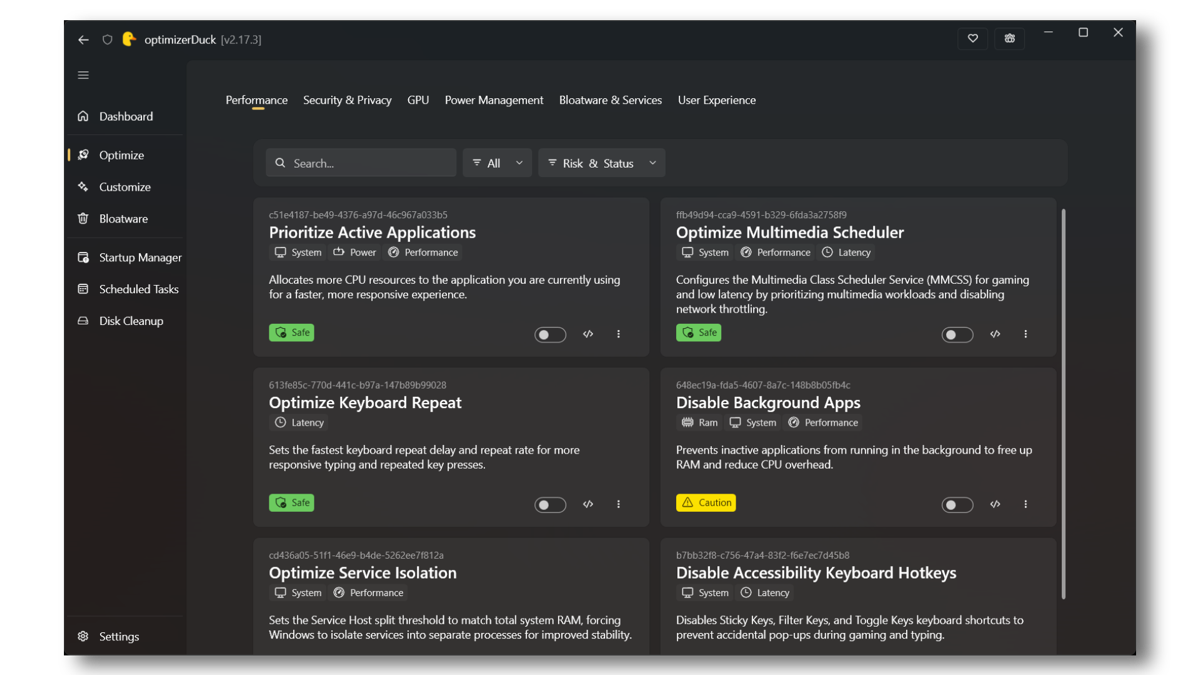
Main modules
| Section | What it covers |
|---|---|
| Performance | Svchost tuning based on RAM, process priority, keyboard latency, high performance power plan |
| Privacy | Telemetry, Advertising ID, Location, Cortana, Copilot, Content Suggestions |
| GPU | Logging tweaks for AMD, NVIDIA and Intel (power states, screen latency) |
| Bloatware & Services | OEM Reinstall Lock and Boot Types for 200+ Services |
| Customize | Desktop icons, taskbar, dark mode, file extensions, classic context menu |
| Built-in tools | Hardware Dashboard, Startup Manager, Scheduled Tasks, Disk Cleanup, AppX Remover |
Summary according to the official README of the project; Specific tweaks evolve with each release. Source: README.es-ES.md
Reversibility, SmartScreen and precautions
Modifying the Windows registry and services carries risk. optimizerDuck mitigates part of the problem with:
- Local backups before each change (revert folder in
%LocalAppData%\optimizerDuck\Revert\). - Revert with one click from the interface itself.
- Safe / Moderate / Risky tags in each optimization.
- Nothing applies alone: you set what to activate.
- Suggestion to create a restore point before first use.
When you download the .exe from GitHub, Windows SmartScreen can warn you because the binary is not digitally signed (expensive certificates for open source projects). The project recommends "More information → Run anyway", compiling from source or parsing the file in sandboxes like ANY.RUN. See Disclaimer.
Recommended download and installation
- Download the latest release from GitHub Releases (e.g.
optimizerDuck-Windows-x64-2.25.5.exe). - Run as administrator (required to touch registry and services).
- After installing drivers and Windows Update on a newly formatted computer, apply only the tweaks that you understand.
- Restart when the app tells you to.
The ideal flow of the README itself: clean Windows → drivers → updates → regular software → optimizerDuck → cleaning apps and starting. This reduces the risk of a large Windows update reversing settings.
What you should and shouldn't expect
Yes: less background noise, unified interface for common tweaks, cleanup and startup tools, auditable open source, zero telemetry in the app.
Do not: magically double FPS, replace a GPU or SSD, or guarantee stability if you activate tweaks marked as Risky without reading. Major Windows updates can reset values; It is advisable to re-export your profile or re-apply from the app.
If you prefer not to touch the registry manually but want transparency, optimizerDuck competes with paid tweakers and scattered scripts for a simple argument: everything is in a public repo, with active community and built-in rollback.
Most read
What readers are engaging with right now.
- World
Cubans protest in Miami against Airlines Connections for alleged scam: they demand up to $20,000 in packages to Punta Cana

- Culture
Goose, the gay app that competes with Grindr, reaches the top 4 of Lifestyle in the App Store

- Culture
Harry Potter on HBO: complete guide to the series (not yet released and already renewed for T2), dates, cast and controversies

- World
Trump declares the ceasefire with Iran over, orders new attacks in Hormuz and demands cutting trade with Spain in NATO

- Culture
DUK App: Aly Sánchez launches her habits app "one day at a time" with a 63-day program

- Culture
I'm Edgy and Edgy Labs: From Nebraska's Walmart to a beef tallow cream brand that sells across the US.

- World
El Cangrejo: profile of Raúl Guillermo Rodríguez Castro, Raúl Castro's grandson between GAESA, leaked luxuries and the first interview of 2026

- World
The FBI is investigating the AFA for alleged fraud and money laundering: about $300 million in sponsorships and operations in the US.

- World
Cuban regime terrorist Ramiro Valdés Menéndez dies