Having your Walgreens vaccines, LabCorp or Quest Diagnostics tests, and notes from your hospital or doctor on your iPhone is not magic: it's Apple's Health app connected to each provider. In real scenarios — before a consultation, in the emergency room or when you get blood results — opening a single site on your mobile saves time and avoids searching for PDFs in the email. This guide explains step by step how to link each source and what to do if your lab still doesn't appear.
1. Why centralize your data on the iPhone
When a laboratory publishes your results or you get vaccinated in a pharmacy chain, the information is usually distributed: hospital web portal, Quest app, LabCorp email, Walgreens account... The Health app does not replace these systems, but it can add them if the provider participates in Health Records on iPhone or gives you a verifiable record (QR or digitally signed file).
The scenario that matters most: Instantly see a blood count, viral load, booster shot, or documented allergy without logging into five different sites. Apple encrypts data on the device and does not sell your history; You decide which accounts you connect and you can disconnect them whenever you want, according to the Apple Support — Health data documentation.
2. Prerequisites
- iPhone with iOS 15.1 or later (for verifiable vaccine records); iOS 11.3+ for classic Health Records. The most recent version available is recommended.
- Apple ID active. To link hospitals and large laboratories, Apple requires two-step verification on the account.
- Accounts at each provider: MyQuest (Quest), LabCorp Patient, Walgreens.com or Walgreens app, and access to MyChart if your hospital uses it.
- Verified identity: in the first connection with a hospital or laboratory, the name, date of birth and sometimes the medical record number or code sent to you by mail are usually requested.
3. Open Health and understand the sections
Step 1. Open the Health app (heart icon).
Step 2. In the bottom tab, tap Browse.
Step 3. Review these categories — they will be your mental map:
- Health Records (Health Records): connections with hospital, Quest, LabCorp, clinics...
- Lab results: Values added when a provider synchronizes tests.
- Immunizations: Vaccines, including those added from Walgreens or hospital.
- Clinical history: conditions, procedures and notes as shared.
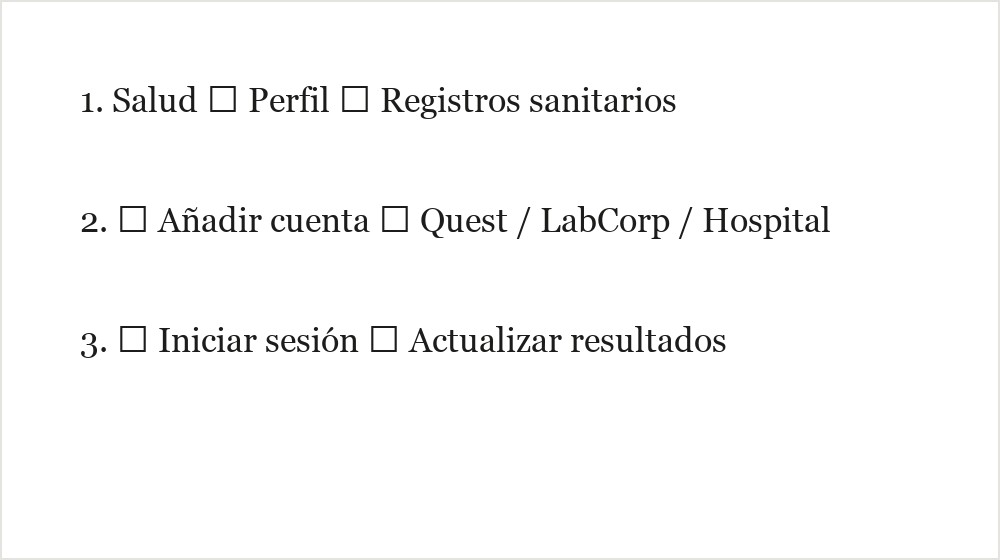
Step 4. Tap your photo or profile icon (top right on recent iOS) → Health Records → Add Account. There you will search by name for the hospital, Quest Diagnostics, LabCorp or another institution. Source: Apple Support — view health records
Frequent suppliers in the US
| Supplier | What it contributes | How to connect |
|---|---|---|
| Quest Diagnostics | Blood, urine, panel analysis | Health → Health records → Quest + MyQuest account |
| LabCorp | Clinical laboratory (same role as Quest) | Health → Health records → LabCorp + patient.labcorp.com |
| Hospital / doctor | Visits, medication, notes, internal labs | Health → search hospital → MyChart portal or other EMR |
| Walgreens | Vaccines in pharmacy | QR/verifiable link from Walgreens account → Health |
Availability by state, hospital and test date. The supplier portal remains the official source.
Video: connect health providers in the Health app
How-to tutorial: Add hospital and pharmacy accounts in Health Records on iPhone. Source: YouTube — Dan's Tutorials
4. Hospital and doctor (Health Records / MyChart)
Most hospital systems in the US (including Florida) use Epic MyChart or another compatible EMR. If your doctor belongs to a group with a patient portal, it is the most complete path: visits, diagnoses, medications and sometimes internal laboratory results.
Step by step — connect your hospital:
- In Health → profile → Health records → Add account.
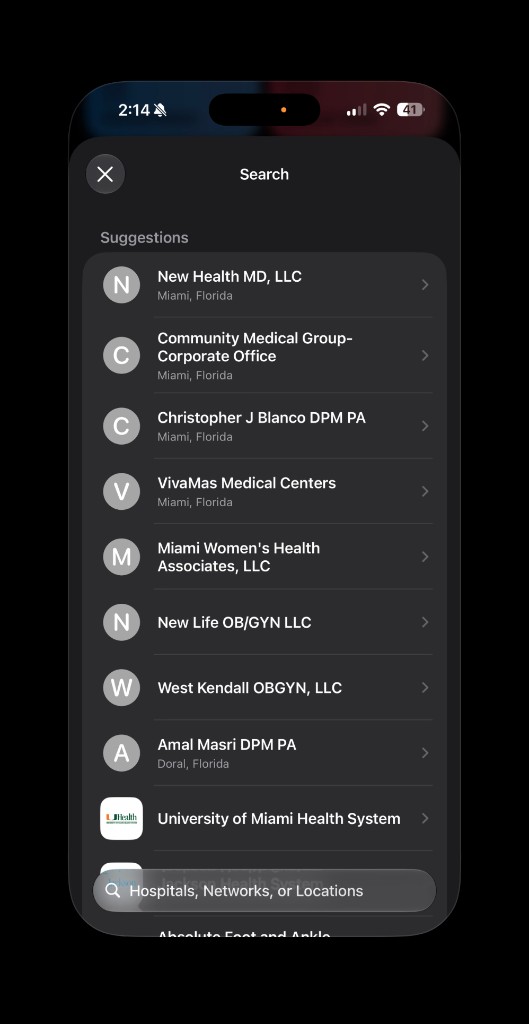
- Look for the official name of the hospital or network (e.g.: «Jackson Health System», «University of Miami Health System», Baptist Health). If it doesn't appear, try the name of the parent network or type the city in the bottom bar (Hospitals, Networks, or Locations).
- Select the institution and tap Connect with account.
- You will be redirected to the hospital's web portal (often MyChart). Log in with your patient username.
- You agree to share data with Apple. The initial download may take several minutes.
- Go back to Health → Health records → your hospital. Swipe down to refresh when you have a new visit.
Tip: If you have never activated the portal, go to the hospital website first, register with the code they gave you at reception and confirm the email. Without an active patient account, Salud cannot link anything.
5. Quest Diagnostics (MyQuest)
Quest is one of the most used laboratories in the US for blood, urine, PCR and routine panel testing. You can see results in the app MyQuest for Patients and also synchronize them with Salud.
Step A — create a MyQuest account (if you don't have one):
- Go to MyQuest or install the MyQuest app from the App Store.
- Register with your email. In the lab, ask that the results be sent to MyQuest (this is usually a box on the intake form).
- Verify identity if requested (date of birth, telephone number).
Step B — connect Quest with the Health app:
- Open Health → profile → Health records → Add account.
- Search for Quest Diagnostics.
- Log in with the same MyQuest credentials.
- Authorizes the connection. Available tests will appear in Lab Results.
Quest confirms in its FAQ that MyQuest results can be viewed in Health on iPhones running iOS 11.3 or later. Source: Quest Diagnostics — MyQuest FAQ
Note: Quest sometimes sends partial updates while completing a panel; Health may show duplicate entries until the final report arrives. If you see strange data, disconnect and reconnect the account from Health Records.
6. LabCorp
LabCorp competes with Quest in clinical analysis. The flow is very similar: account in the patient portal and link from Health.
Step by step:
- Create or access your account at patient.labcorp.com.
- When visiting the Patient Service Center, confirm that your doctor ordered the tests and that LabCorp has your correct email.
- On iPhone: Health → profile → Health Records → Add account → search for LabCorp.
- Sign in to the portal when Health redirects you.
- After authorization, the results published in LabCorp are reflected in Health (there may be a delay of hours depending on the type of test).
If your doctor sent the order to LabCorp but you don't see anything, go to the LabCorp web portal first: sometimes the result is there and syncing with Apple takes a little longer.
7. Walgreens (vaccines and pharmacy)
Walgreens administers millions of vaccines (flu, COVID-19, shingles, etc.). There are two ways to get them to the iPhone:
Option A — Verifiable record (QR or link)
Apple supports digitally signed vaccination records that you can add to Health and Wallet. Source: Apple Support — verifiable records
- Log in at walgreens.com or the Walgreens app with the same account used when you got vaccinated.
- Look for the immunization records / vaccine history section (the exact menu may vary by state).
- If Walgreens offers QR code or download health record, open it on iPhone.
- Tap the link or scan the QR with the camera → choose Add to Wallet and Health.
- Check in Health → Immunizations which appears with a check mark.
Important: Not all states or all pharmacies display QR yet. If you don't see the option, use Option B or ask for a paper record and scan a clear copy into Photos (it's not verifiable, but it's a backup).
Option B — Through the connected hospital
If you were vaccinated at Walgreens but your insurance or primary care provider documented the vaccine in Epic/MyChart, it may appear automatically when you sync with the hospital (section 4). Check both sources.
8. Consult analyzes and vaccines instantly
When you already have connected accounts, this is the daily flow:
- New blood tests: Health → Examine → Lab results. Filter by date or laboratory (Quest / LabCorp). Tap a value to see reference range.
- Vaccines: Browse → Immunizations. Verify trade name, batch and date.
- Recent visit: Browse → Health records → [your hospital] → swipe to update → review Clinical history or visit notes.
- Share with a doctor: Apple allows you to export a summary PDF from Health Records or share categories with compatible apps. Source: Apple Support — sharing with providers
Quick Widget: There is no official Lab Results widget, but you can pin Health to the App Library or use Spotlight by typing “Health” and go straight to Lab Results.
9. Privacy and security
- Health data on iPhone is encrypted and protected by Face ID, Touch ID, or device passcode.
- Disconnect a provider: Health → Health Records → [account] → Delete account. That doesn't erase your history at Quest, LabCorp, or the hospital; it just stops syncing with Apple.
- Do not share screenshots of results on public networks: they include personal identifiers.
- In family members: you can use Shared Health (iOS 15+) to see data from children or elders with their permission, useful for pediatric vaccines.
10. Common problems
If something goes wrong when connecting Walgreens, Quest, LabCorp, or your hospital, start with these answers.
- My hospital is not appearing in the search?
- The facility may not participate in Health Records. Ask admission if they use Epic/MyChart or another compatible EMR, or check the hospital web portal in the meantime.
- Does Quest say “unavailable” when reconnecting?
- It is an intermittent failure that several users report. Wait a few hours, update iOS and check MyQuest directly; If it persists, disconnect the account in Health Records and link it again.
- Does Quest or LabCorp show duplicate results?
- Some laboratories send partial updates and Salud may repeat entries. Disconnect the provider in Health Records, reauthorize, and leave only the report marked final.
- Walgreens not showing the vaccine QR?
- It depends on the state and when you were vaccinated. Check your account at walgreens.com, save the portal PDF, or scan the physical card as a backup.
- Are the analyzes on the portal but not in Health?
- Open Health Records → your provider → scroll down to update. Check on the portal that the result is already in “Final” status and not “Partial”.
- I don't remember the password for the hospital portal?
- Use “Forgot Password” on MyChart or the center's website before trying to connect Health. Without access to the patient portal, Apple cannot download records.
11. In summary
The scenario you're looking for—Walgreens vaccines, LabCorp or Quest analytics, hospital and doctor data on iPhone—is solved by connecting each source once in Health → Health Records, plus verifiable Walgreens records where they exist. Then, opening Laboratory Results or Immunizations gives you an instant response on your mobile.
Start with the provider you use the most (Quest or your hospital), verify that the results reach the web portal and then link Apple. If a step fails, the original portal remains the source of truth until the sync works.
Most read
What readers are engaging with right now.
- Culture
Goose, the gay app that competes with Grindr, reaches the top 4 of Lifestyle in the App Store

- World
Cubans protest in Miami against Airlines Connections for alleged scam: they demand up to $20,000 in packages to Punta Cana

- World
Trump declares the ceasefire with Iran over, orders new attacks in Hormuz and demands cutting trade with Spain in NATO

- Culture
Harry Potter on HBO: complete guide to the series (not yet released and already renewed for T2), dates, cast and controversies

- Culture
DUK App: Aly Sánchez launches her habits app "one day at a time" with a 63-day program

- Culture
I'm Edgy and Edgy Labs: From Nebraska's Walmart to a beef tallow cream brand that sells across the US.

- Culture
The Evening of the Year VI: all the winners, fights and performances of the Ibai night in Seville

- World
The FBI is investigating the AFA for alleged fraud and money laundering: about $300 million in sponsorships and operations in the US.

- World
El Cangrejo: profile of Raúl Guillermo Rodríguez Castro, Raúl Castro's grandson between GAESA, leaked luxuries and the first interview of 2026
