Figma celebrated its annual Config conference this June 24, 2026 with a keynote by Dylan Field and a wave of ads that turn the canvas into a more expressive space: Motion with native timeline, Weave integration, generative plugins with shaders, export improvements and a 3D transformation preview. The full keynote is on YouTube; The clips that Figma published in X are played here with the same player as the rest of the news.
Video: keynote Config 2026 — Dylan Field
Official Figma product presentation at Config 2026, with Motion, Weave, shaders and 3D transforms. Source: Figma — YouTube · @figma — X
Video: teaser Config 2026, refreshed
30-second preview of the stage and visual identity of Config 2026. Source: Figma — YouTube
Figma Motion: the canvas now has a timeline
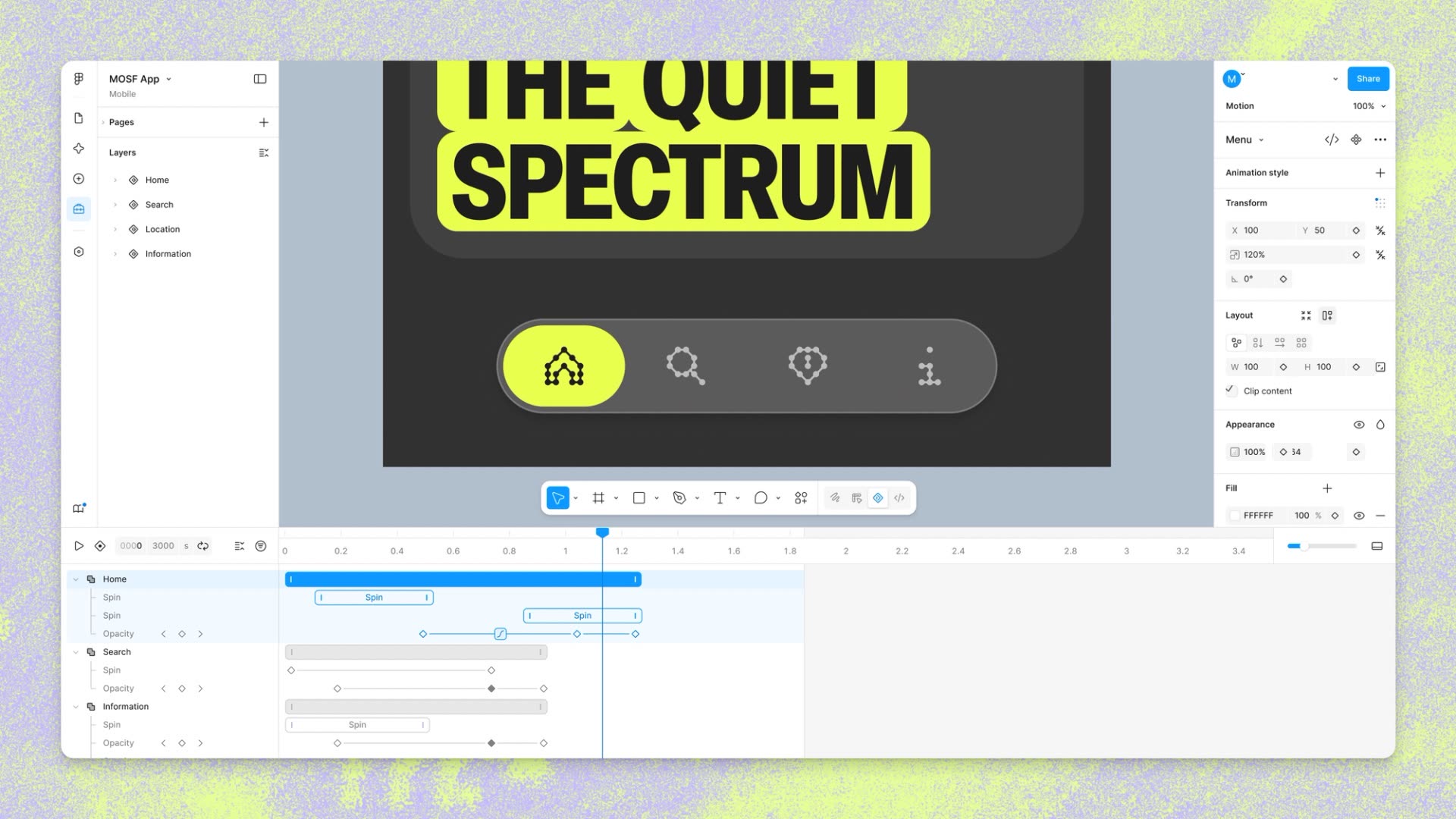
The star announcement of the day is Figma Motion: a new mode alongside Design, Draw and Dev that adds an animation timeline directly to the file. According to the official blog post, any frame can go to Motion mode to keyframe position, scale, rotation and opacity; stack preset animation styles (fade, move, scale); and comment on specific moments in time.
Figma confirms that Motion is now available in open beta. Starter users access with limited exports; Full seats in all plans can use motion primitives and export. Full integration with design systems and the Figma agent for motion are reserved for paid plans. Announcement on
The blog highlights two pieces of system that change the workflow: animated components — the motion travels with the component such as fill or typography — and motion variables with modes that update all referenced animations when changing pages. Shaders extend the animatable: any property exposed by a shader can be keyframed. Motion also supports MCP, so a code agent receives the full context of the animation.
Weave comes to the design canvas
Figma integrates tools from Figma Weave—its AI creative product—into the main canvas. The live demo shows how Weave flows coexist with design frames in the same file, in line with the post Connecting Figma and Weave.
Video: Weave on the Figma canvas (@figma)
Demo published in X of the Weave tools integrated into the design canvas. Source: @figma — X
3D Transformations – Live Preview
Figma advanced native 3D transforms: rotate frames, vectors and text on the Z axis with on-canvas controls and real-time preview. Each transformation remains editable and the result is exported to CSS and connected via MCP—combinable with Motion for spatial prototypes that previously required external tools. The product is not yet available; Figma opened waitlist from the Motion blog.
Video: 3D transforms preview (@figma)
Config 2026 clip with the first demo of native 3D transformations on the canvas. Source: @figma — X
Generative Plugins and Shadersville
In a live session with @rogie and @georgiarust3, Figma walked through generative plugins and a tour of Shadersville: shader effects whose properties can be animated in the Motion timeline. It is the direct response to the historical limitation of animatable properties in Figma.
Video: generative plugins and Shadersville (@figma)
Config Live Session 2026 with @rogie and @georgiarust3. Source: @figma — X
Export without leaving the flow
Motion allows you to export animated frames as MP4, GIF, SVG or WEBM from the file itself — useful for aligning stakeholders before handoff. The light-hearted tone of the Figma clip—“Screaming crying exporting”—sums up the relief of teams that previously jumped between After Effects, Lottie, and the canvas to close out an animation.
Video: export animations from Motion (@figma)
GIF published by Figma on export from Motion without leaving the file. Source: @figma — X
What it means for design and development
Config 2026 pushes Figma beyond the static mockup. Motion reduces the broken handoff between design and code; Weave brings AI generation closer to the production file; 3D transforms and shaders expand the visual vocabulary without third-party plugins; and Dev Mode delivers CSS and motion.dev ready to deploy. For product teams, the message is clear: animation stops being a last-minute “extra” and becomes part of the design system from the first frame.
«Atomic design is now atomic motion design because I have keyframes on the canvas. It’s the last big piece in the interactive world.”
Most read
What readers are engaging with right now.
- Culture
Goose, the gay app that competes with Grindr, reaches the top 4 of Lifestyle in the App Store

- World
Cubans protest in Miami against Airlines Connections for alleged scam: they demand up to $20,000 in packages to Punta Cana

- World
Trump declares the ceasefire with Iran over, orders new attacks in Hormuz and demands cutting trade with Spain in NATO

- Culture
Harry Potter on HBO: complete guide to the series (not yet released and already renewed for T2), dates, cast and controversies

- Culture
DUK App: Aly Sánchez launches her habits app "one day at a time" with a 63-day program

- Culture
I'm Edgy and Edgy Labs: From Nebraska's Walmart to a beef tallow cream brand that sells across the US.

- Culture
The Evening of the Year VI: all the winners, fights and performances of the Ibai night in Seville

- World
The FBI is investigating the AFA for alleged fraud and money laundering: about $300 million in sponsorships and operations in the US.

- World
El Cangrejo: profile of Raúl Guillermo Rodríguez Castro, Raúl Castro's grandson between GAESA, leaked luxuries and the first interview of 2026
