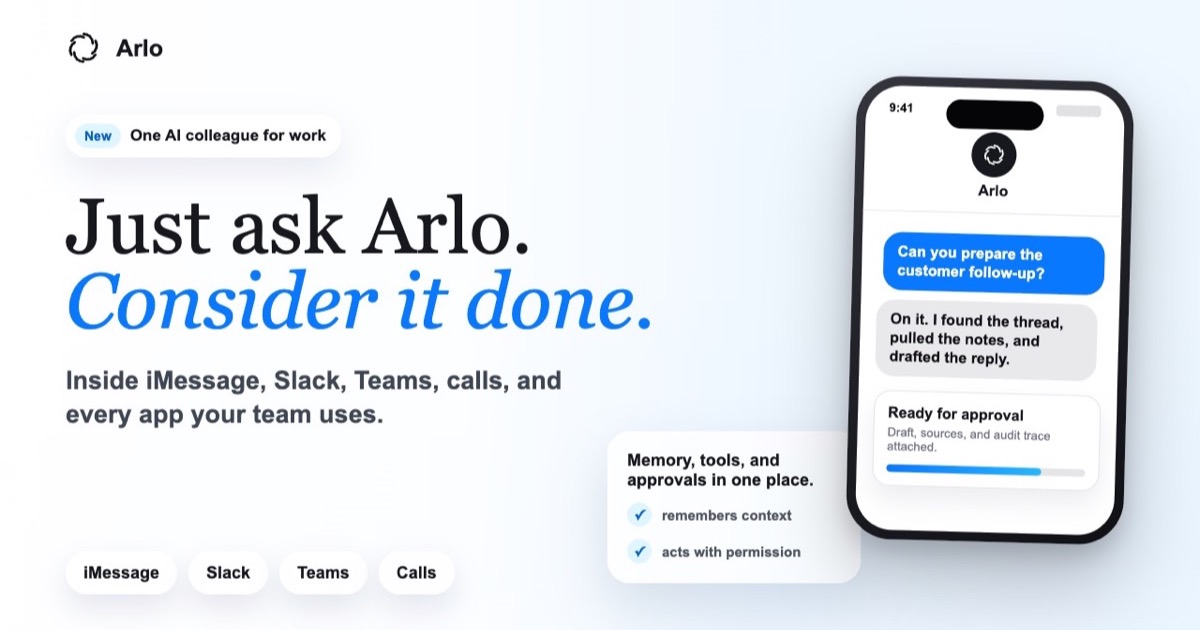
The category of personal assistant per message — like Poke in iMessage— is already consolidated in consumption. Arlo goes for the other extreme: an AI colleague for the workspace that does not require installing another app, that remembers the team's context, executes actions in Slack, Gmail, Notion or GitHub and, above all, asks for permission before sending anything sensitive. Their motto on the website: Just ask Arlo. Consider it done.
A single Arlo for the entire team
According to Arlo home page, the product does not compete with an isolated chatbot but with the idea of a shared companion connected to the stack that the company already uses. You can write to them in a Slack channel (#renewals, for example), ask them to handle a customer renewal, and see how they respond in the thread—even while they're on a call taking notes—without leaving the usual flow.
The official channels are iMessage and SMS, Slack, Microsoft Teams and phone calls. Arlo also offers to try the service by texting or calling, based on the "Text Arlo" and "Call Arlo" buttons on the cover. In his guide to AI assistant in Slack (July 2026) he details how it is installed in minutes, without a long rollout: you mention Arlo in a channel as a colleague and each connection is limited by policy from day one.
Context: how the personal assistant competes per message (Poke)
Arlo differs from personal assistants like Poke; This official clip shows the iMessage conversational model that Arlo cites in his comparison table. Source: poke.com
3,000 integrations — and apps without API
Arlo declares support for Slack, Gmail, Notion, Linear, GitHub and more than 3,000 other tools. The business case is that a single agent is “wired” to the entire stack instead of fragmenting automations by department.
The most striking nuance is the section «No API? Arlo still gets in»: If an internal tool doesn't expose APIs, you name the portal in the chat, log in once in a secure browser session, and Arlo operates the interface—clicks, reading screens, forms—as a person would. The company insists that it does not see your password; you authenticate, Arlo acts within the bounded session.
Governance: act decisively, ask first
Where many consumer assistants prioritize speed, Arlo focuses the discourse on governance by default. Each draft, submission, or write to a tool can remain in Pending status until the configured reviewer clicks approve. The example on the website—a renewal email to ben@acme.com after extracting a usage report—shows the flow: Arlo prepares, you review, the trace is attached.
- Scoped access — individual, team, or enterprise connections resolved by policy before each run.
- Approval gates — drafts, submissions, and writes await the reviewer you define.
- Audit traces — every tool, source, artifact, and approval call tied to the original request.
Night report and morning briefing
Arlo promises to organize your memory at night, detect automations that deserve to be executed and deliver a single summary in the morning: triad tray (the web demo goes from 32 to 4 messages), pending renewals, standup published in Slack, etc. The idea is to start the day “up to date” without opening five dashboards.
Arlo vs. Poke: staff vs. team

In its guide Arlo vs Poke (updated June 2026), the company draws the line clearly: Poke, from The Interaction Company, is a personal assistant in iMessage, WhatsApp and Telegram for the digital life of a single person. Arlo targets teams and businesses with Slack, Teams, calls, reviewer approvals, and audit trails.
The official table summarizes crossed advantages: Poke stands out in lightness and personal recipes; Arlo adds live calling, access to API-free tools, admin policies, and SSO on the Business plan. If you already know our Poke coverage, Arlo is the “enterprise” answer to the same conversational gesture.
Prices and plans
Team — usage-based pricing: designed for teams starting with a shared Arlo. Includes Slack, Teams, Gmail, and Messages, approval traces on every run, massive integrations, and weekly automation suggestions.
Business — custom pricing: Add administrator policies and roles, private specialist agents, team/company level memory controls, SSO and audit export. Requires booking a demo according to the website.
Documentation and API
Arlo maintains public documentation with APIs, webhook events, CLI commands and operational concepts — a sign that the product is not just a chat layer, but an integrable platform for its own flows.
Editorial verdict
Arlo condenses three 2026 trends: native messaging assistants, agents with real tool use and, increasingly, compliance checks before acting. It does not replace a CRM or an ERP; it tries to be the conversational interface that traverses them with explicit permission. If your team already lives in Slack or Teams and needs to automate renewals, mail triage or reports without losing track of who approved what, you deserve the free trial offered by arlo.sh. If you're looking for an assistant just for you on your mobile, Poke continues to be the reference in the consumer category — and Arlo recognizes it bluntly.
Most read
What readers are engaging with right now.
- Culture
Goose, the gay app that competes with Grindr, reaches the top 4 of Lifestyle in the App Store

- World
Cubans protest in Miami against Airlines Connections for alleged scam: they demand up to $20,000 in packages to Punta Cana

- Culture
Harry Potter on HBO: complete guide to the series (not yet released and already renewed for T2), dates, cast and controversies

- World
Trump declares the ceasefire with Iran over, orders new attacks in Hormuz and demands cutting trade with Spain in NATO

- Culture
DUK App: Aly Sánchez launches her habits app "one day at a time" with a 63-day program

- Culture
I'm Edgy and Edgy Labs: From Nebraska's Walmart to a beef tallow cream brand that sells across the US.

- World
El Cangrejo: profile of Raúl Guillermo Rodríguez Castro, Raúl Castro's grandson between GAESA, leaked luxuries and the first interview of 2026

- World
Cuban regime terrorist Ramiro Valdés Menéndez dies
- World
Supreme Court, June 23, 2026: analysis of Tuesday's 5 rulings (and what each one implies)