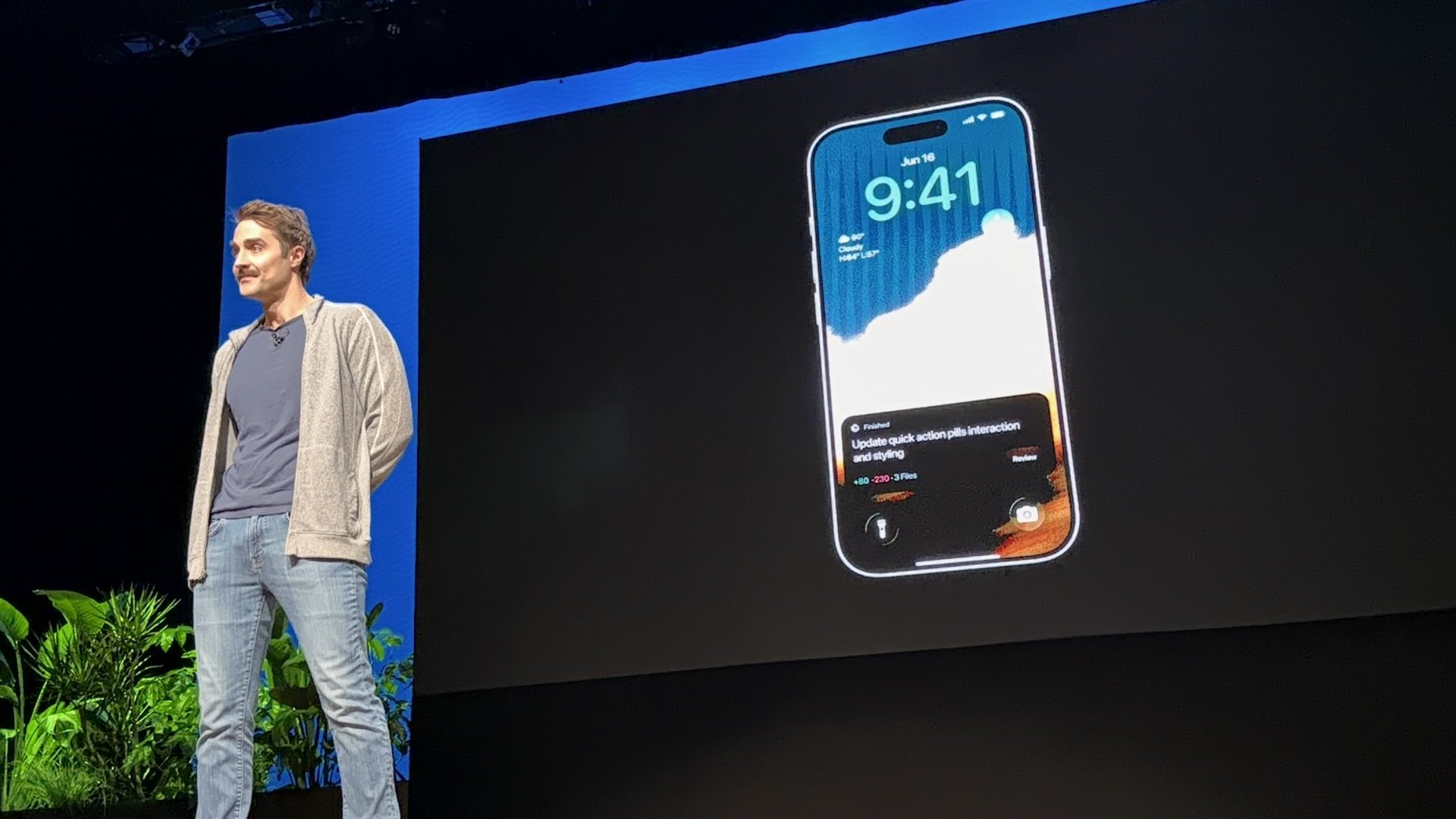
Cursor has concentrated in one week the largest expansion of its platform since it popularized code editing with AI. Between June 16 and 18, 2026, the official account @cursor_ai and several early access users announced Cursor Mobile, agents migrating to the cloud, the /in-cloud command for isolated subagents, the /automate skill to set up natural language automations and a new trigger for emoji reaction in Slack. The common bet: the agent stops depending on the open laptop and becomes a service that is launched, monitored and reviewed from anywhere.
Cursor Mobile: agents in your pocket
On Monday, June 16, Morgan Linton published the screenshot of a stage presentation: an iPhone on the lock screen shows a Cursor notification with the status Finished, the title of the task ("Update quick action pills interaction and styling »), the diff (+80 −230 · 3 files) and a Review button. Hours later, Chris Laupama shared the public link of the iOS beta on TestFlight: testflight.apple.com/join/A5DcPyIOnt.
The TestFlight page describes the app as a way to "work with your agents on the go". Requires iOS 16 or later and invites you to install TestFlight, accept the invitation and download the build. At the time of writing this article, the beta appeared as full (“This beta is full”), a sign of high demand; It is advisable to check the link periodically in case Cursor opens more places.
From local to cloud: the laptop can be closed
On Tuesday, June 17, Cursor published that "it is now easier to move local agents to the cloud" so that they continue working with the laptop closed. According to the announcement in
Video: Move to Cloud
“Move to Cloud” button on a local agent: Work continues in the cloud with the laptop closed. Source: @cursor_ai
Video: /in-cloud
/in-cloud boots a subagent in its own VM in the cloud, isolated from the local workspace.
Source: @cursor_ai
In a complementary thread from the same day, Cursor detailed /in-cloud: a command to start a subagent in its own virtual machine in the cloud, especially useful for long or parallel work that should not saturate the local workspace. The combination of “Move to Cloud” and “in-cloud” draws a layered architecture: main agent in the editor, sub-agents in dedicated VMs and remote monitoring from the phone.
/automate: automations described in natural language
On Wednesday, June 18 at 19:00 UTC, Cursor introduced /automate, a skill that allows agents to set up automations for you. According to the official post, you describe the task in plain language and Cursor defines triggers, instructions and tools — the same pattern as the editor's Automations interface, but accessible from the agent chat.

The video captures show flows such as mobile bug triage via Slack: the agent reads threads, applies a triage skill, corrects and reports in a channel. Automations support scheduled triggers, Git events, webhooks, Linear, PagerDuty, Sentry, and Slack messages or reactions—with tools like publishing to Slack, reading channels, and connected MCP servers.
Video: skill /automate
Introducing /automate: Describes the task and Cursor mounts the automation. Source: @cursor_ai
Video: emoji trigger in Slack
React with an emoji to any Slack message to launch an automation. Source: @cursor_ai
Minutes later, in response to the same thread, Cursor added that Cursor Automations supports an emoji trigger in Slack: reacting to any message can start an execution. It is the lighter version of “automate from where you already work”: without cron or webhook, a 👀 or ✅ in an incident thread can start an agent.
What it means for those who program with AI
Until recently, Cursor was mostly an IDE on the Mac with a chat panel. This week it redefines it as agent platform: local when you need to iterate quickly, in the cloud when the work is long or parallel, on the mobile to supervise and in Slack to trigger flows without opening the editor. The /automate skill lowers the barrier even further: anyone who does not want to fill out trigger forms can ask the agent to do so in one sentence.
There remain open questions—cloud computing prices, mobile beta limits, availability on Android—that Cursor has not yet detailed in the tweets. What is clear is the direction: compete not only as a model, but in where and when the agent can act. If June 2026 was the month of agents in iMessage (Poke, Liquid Co-Invest), Cursor is committed to bringing that same logic to the software development flow — with PRs, demos and automations in Slack as a team interface.
Most read
What readers are engaging with right now.
- Culture
Goose, the gay app that competes with Grindr, reaches the top 4 of Lifestyle in the App Store

- World
Cubans protest in Miami against Airlines Connections for alleged scam: they demand up to $20,000 in packages to Punta Cana

- World
Trump declares the ceasefire with Iran over, orders new attacks in Hormuz and demands cutting trade with Spain in NATO

- Culture
Harry Potter on HBO: complete guide to the series (not yet released and already renewed for T2), dates, cast and controversies

- Culture
DUK App: Aly Sánchez launches her habits app "one day at a time" with a 63-day program

- Culture
I'm Edgy and Edgy Labs: From Nebraska's Walmart to a beef tallow cream brand that sells across the US.

- Culture
The Evening of the Year VI: all the winners, fights and performances of the Ibai night in Seville

- World
The FBI is investigating the AFA for alleged fraud and money laundering: about $300 million in sponsorships and operations in the US.

- World
El Cangrejo: profile of Raúl Guillermo Rodríguez Castro, Raúl Castro's grandson between GAESA, leaked luxuries and the first interview of 2026
