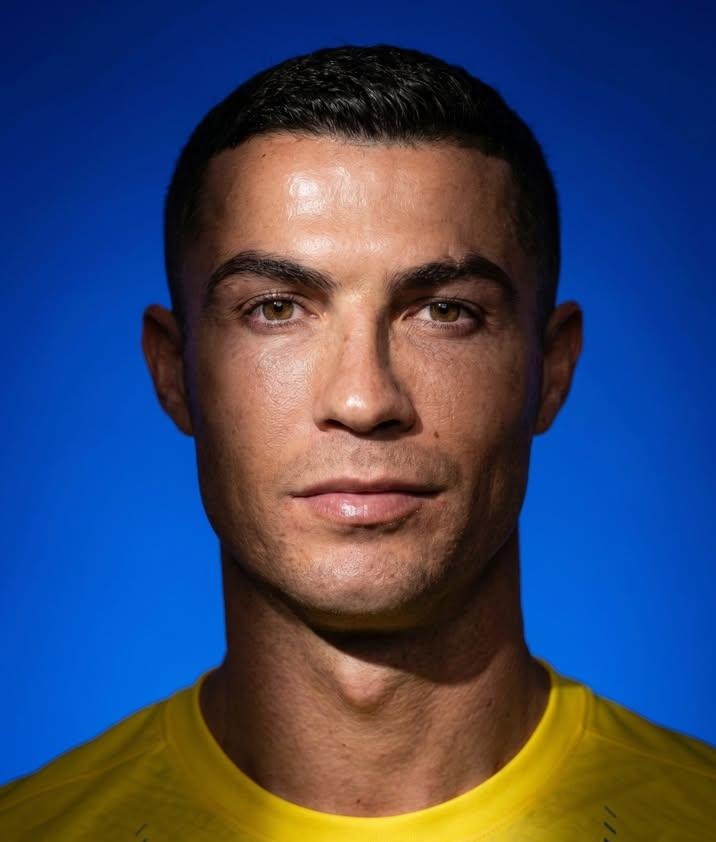
In the early hours of June 20, Anissa (@SimplyAnnisa) shared on X a prompt for Nano Banana 2 within OpenArt AI. The formula is aimed at editorial campaign portraits: close-up with slightly tilted head, confident expression, photorealistic skin and a hard light from above-front that casts a clear shadow on part of the face and neck.
AI Prompt · How to do it

Second result of the same prompt with another color gradient. @SimplyAnnisa
Steps
- Open openart.ai and select the Nano Banana 2 model.
- Attach a clear reference photo of the subject (face clearly visible).
- Paste the complete prompt in English.
- Choose one of the suggested gradients: orange-red, emerald green, royal blue or deep purple.
Prompt to copy
Nano banana 2 on @openart_ai Use the attached reference photo as the subject. Maintain the exact facial features, face shape, skin tone, hairstyle, and unique characteristics of the person in the reference image. Close-up portrait, head slightly tilted, natural confident expression, sharp focus on the eyes, clean and elegant pose, wearing simple solid-color clothing matching the reference photo, vibrant solid color gradient background (choose: orange-red / emerald green / royal blue / deep purple), strong hard directional studio light from the front-top angle, dramatic shadow falling across part of the face and neck, high contrast between lit and shadowed areas, sharp defined shadow edge, warm or cool color grading depending on background choice, photorealistic skin texture with natural highlights and fine details, glowing healthy skin tone, shot on Canon EOS R5, 50mm f/1.8 lens, sharp focus on face, slightly soft blurred background, ultra-high resolution, 8K, editorial fashion campaign aesthetic, bold, clean, and confident mood
Text in English according to the original publication. You need your own reference photo or permission to use it; Do not upload third-party images without consent.
What makes this prompt special
Unlike generic “professional portrait” prompts, Anissa sets three specific layers: fidelity to the reference subject, solid gradient background palette (four closed options) and hard lighting with cut shadow, a resource widely used in fashion and beauty campaigns. The mention of Canon EOS R5 and 50mm f/1.8 pushes the model towards short depth of field and micro-detailed skin, not towards a flat render.
Anissa had already made other prompts viral on ChatGPT and ImagineArt in June; This piece shows its rotation towards OpenArt AI and the Nano Banana 2 ecosystem. The thread accumulated more than 1,600 views, 71 likes and 12 saves in the first hours, with dozens of responses from users testing color variants.
Tips for better results
Use a frontal or three-quarter reference with good light and without aggressive filters. If the shadow doesn't fall where you want, repeat the prompt adding "shadow on the left side of the face" or "shadow on the right cheek." For a warmer look, choose the orange-red gradient; for cold editorial, royal blue or deep purple.
Before publishing
Portraits generated from real photos may have privacy and image rights implications. Do not use other people's faces without permission or generate misleading content. Review OpenArt AI's policies for commercial use and synthetic content.
Most read
What readers are engaging with right now.
- Culture
Goose, the gay app that competes with Grindr, reaches the top 4 of Lifestyle in the App Store

- World
Cubans protest in Miami against Airlines Connections for alleged scam: they demand up to $20,000 in packages to Punta Cana

- World
Trump declares the ceasefire with Iran over, orders new attacks in Hormuz and demands cutting trade with Spain in NATO

- Culture
Harry Potter on HBO: complete guide to the series (not yet released and already renewed for T2), dates, cast and controversies

- Culture
DUK App: Aly Sánchez launches her habits app "one day at a time" with a 63-day program

- Culture
I'm Edgy and Edgy Labs: From Nebraska's Walmart to a beef tallow cream brand that sells across the US.

- Culture
The Evening of the Year VI: all the winners, fights and performances of the Ibai night in Seville

- World
The FBI is investigating the AFA for alleged fraud and money laundering: about $300 million in sponsorships and operations in the US.

- World
El Cangrejo: profile of Raúl Guillermo Rodríguez Castro, Raúl Castro's grandson between GAESA, leaked luxuries and the first interview of 2026
