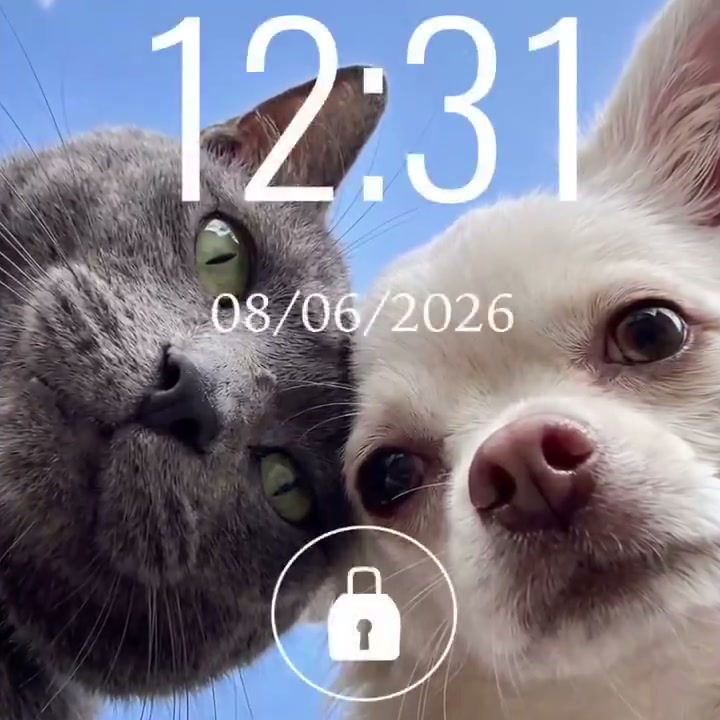
On June 18, Google in Spanish shared on X a trick to create pet wallpapers with Gemini. It's not a new feature: it's a specific prompt that anyone can copy today at gemini.google.com.
AI Prompt · How to do it
Official video: from the reference photos to the final wallpaper. @googleespanol
Steps
- Open gemini.google.com and log in.
- Upload clear photos of your cat and dog.
- Paste the prompt below and generate the image.
- Download the variant you like the most as a background.
Prompt to copy
Create a very close-up, low-angle selfie of my cat and my dog looking at the camera. Blue sky, clouds, natural light.
Imaging may require Gemini Advanced depending on your region. Use photos of yourself or with the owner's permission.
What makes this prompt special
Extreme close-up and low angle push towards a selfie with big eyes and prominent noses—the viral style of pet wallpapers. Blue sky, clouds, natural light leave a clean background that fits well on vertical screens. If you don't convince the first time, try "golden sunset" or order just one animal.
Before publishing your wallpaper
Gemini can alter fur, eyes or proportions from the real photo. Review Google's privacy policy on personal images and do not upload third-party photos without permission.
Most read
What readers are engaging with right now.
- Culture
Goose, the gay app that competes with Grindr, reaches the top 4 of Lifestyle in the App Store

- World
Cubans protest in Miami against Airlines Connections for alleged scam: they demand up to $20,000 in packages to Punta Cana

- World
Trump declares the ceasefire with Iran over, orders new attacks in Hormuz and demands cutting trade with Spain in NATO

- Culture
Harry Potter on HBO: complete guide to the series (not yet released and already renewed for T2), dates, cast and controversies

- Culture
DUK App: Aly Sánchez launches her habits app "one day at a time" with a 63-day program

- Culture
I'm Edgy and Edgy Labs: From Nebraska's Walmart to a beef tallow cream brand that sells across the US.

- Culture
The Evening of the Year VI: all the winners, fights and performances of the Ibai night in Seville

- World
The FBI is investigating the AFA for alleged fraud and money laundering: about $300 million in sponsorships and operations in the US.

- World
El Cangrejo: profile of Raúl Guillermo Rodríguez Castro, Raúl Castro's grandson between GAESA, leaked luxuries and the first interview of 2026
